Nov. 4 2026
In its initial version, MetaMusic allows for the simple integration of SOCAN members’ catalogs as available on their SOCAN portal. This enables the automatic creation of works within this catalog using publicly available information from the SOCAN database, while also identifying any errors. This is the easiest way for songwriters and publishers to add their works to MetaMusic. As SOCAN develops new digital tools by integrating Spanish Point, we are collaborating with them to implement update processes.
Until the development of these new tools is complete, you must continue to register your works directly with SOCAN. The sooner you do this, the better to minimize the impact of current processing times. It takes some time for your new work registered with SOCAN to be assigned its final SOCAN code and its International Standard Work Code (ISWC). The benefits of registering your works as early as possible are numerous, and we will discuss them further later.
In the meantime, let’s talk about importing and diagnosing the SOCAN catalogue in MetaMusic! To discover the benefits, check out this more detailed article on diagnosing your catalogue of works!
How to import and analyze your SOCAN catalog in MetaMusic
The entire process takes about ten minutes at most.
If you haven’t yet created an account on the MetaMusic Portal, you can learn more about the account creation process. and add a creator or publisher role depending on your situation.
1 – Export your SOCAN catalog from your portal
The SOCAN portal therefore allows you to export a catalog of your works in CSV format. This contains the main public metadata of your works:
- Title
- Length
- SOCAN Number
- ISWC
- Creators(s) (songwriter(s), composer(s), translator(s), arranger(s), etc.)
- Publisher(s)
This catalog, you can do it yourself by downloading it via your account on the SOCAN portal.
1 – Log in to your account

2A – If you have a single music catalog, go to the list of works and select the .csv download option. Then save your file somewhere you can easily find it. It will be named simply catalog.csv; you can, of course, rename it for future reference.

2B – If you have multiple music catalogs, you can download all your content into a single CSV file by selecting “All catalogs” and then “Download complete catalog.” Save your file to a location where you can easily find it. It will be named simply catalog.csv; you can, of course, rename it for future reference.

If you are not a SOCAN member but are affiliated with another copyright management society, you will not currently be able to directly import your catalogue of works into MetaMusic unless you collaborate with publishers, sub-publishers, or creators who are SOCAN members. Contact.
If that’s not the case, you can still take advantage of MetaMusic if you want to make some of your works accessible to producers or performers in Quebec and Canada. Here’s how:
- Add your IPI to your creator role: if you have collaborated with songwriters or publishers who are members of SOCAN, you will see works added to your list of works each time one of its members makes a new import.
- You can create your works manually using the information available in your own works catalog (or via the CISAC search engine) taking care to add the ISWC and identify the creators and publishers.
- In case of questions or specific needs to process a large foreign catalogue, please contact the MetaMusic team.
Your catalogue is ready to be added to MetaMusic.
2 – Import your SOCAN catalogue into MetaMusic
Once you have your catalogue in hand, now go to the MetaMusic’s work management module. This is where you will do the import.
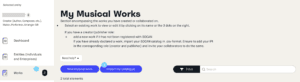
1 – In the Works section, select import my catalog
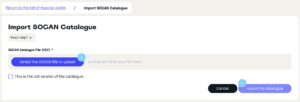
2 – You can now directly add your file and then select Import my file to start the import which only takes a few seconds.
3 – Once the import is complete, you can view the report. MetaMusic will only add works validated by SOCAN and with a definitive SOCAN number. If a work appears in your catalog with a UNV code or if the SOCAN number begins with an A, it will not be added this time. This highlights the importance of declaring songs as early as possible. If one of your works has a SOCAN number that begins with an A, you will need to import a new catalog later. The processing time is at least two weeks.
4 – If your catalogue includes collaborators who are not yet active in MetaMusic, you will have 2 options:
- Invite them if you have their email address available.
- If you are a publisher with artist creation rights and you are their publisher, you can create their profile yourself. To obtain these access rights, please consult our article on collaborator mobilization or contact MetaMusic.
This list of collaborators will remain available until you perform a new import!
5 – To maximize the impact of this SOCAN import diagnostic, MetaMusic provides you with a list of invalid works or works that cannot be added at this time, along with the reasons why. These works are available on the platform or can be downloaded as an Excel file, allowing you to make corrections if necessary. As you will see from this article, between 5 and 10% of the catalogs contain errors that can be corrected.
Valid and complete works that are added bear the notation Imported SOCAN and you can now improve them.
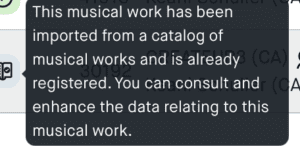
3 – Enhance your work by adding lyrics and more
Once your works are created, you can enhance them individually by adding:
- the year of composition
- the category (popular, jazz or classical)
- their words and languages
The most important element remains the lyrics and languages since these elements can be used when one of your works is used in a sound recording, in particular.
1- Add a category and the year of composition
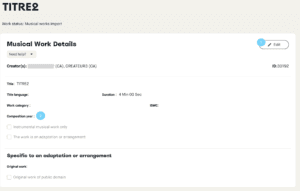
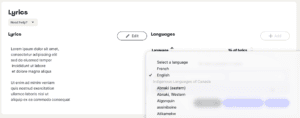
2 – Add the lyrics and the language(s) of the lyrics. These lyrics can then be used in their entirety when associated with a sound recording. Therefore, it is not necessary to add everything at once, apart from the works themselves.
You can document creations in French and English, as well as in some twenty Indigenous languages spoken in Canada and other languages from around the world. This addition of Indigenous languages will ultimately facilitate the documentation of First Nations language content and promote its integration into the music data ecosystem.
TIP: A good practice is to gather your lyrics in a Word/Open Office document, Excel spreadsheet (or their equivalent in the cloud like Google Doc or SharePoint) so that you can easily access and copy them at this stage and keep a permanent record.
GOOD TO KNOW: MetaMusic and APEM are already evaluating a potential integration – in 2025 – with the Evangeline tool to retrieve the lyrics that are already listed there and to take over sending to services such as MusixMatch, LyricFind and Copibec.
Your works are now ready to be used and added to sound recordings and officially associated with them.
And Now?
Now that you have gathered your basic information, created an account on the MetaMusic portal, gathered your collaborators, and added your SOCAN catalogue of works, you can begin documenting: