
Nov. 4 2026
During the documentation process in MetaMusic, you will be asked to identify all collaborators who participated in the work, recording, or release. This includes individuals as well as companies. For the documentation of your next album to be completed quickly, collaborator involvement is critical.
This requires thoroughly documenting all those involved in the creation or production of a track. Whether their involvement was in creation, recording, or marketing, be sure to note everyone’s role to ensure no one is overlooked. We recommend documenting each contributor at every stage of the process, particularly during the writing and composition of the work, as well as during studio recordings, including mixing and mastering sessions.
Who to Invite?
In an ideal world, everyone would already be using MetaMusic, but it’s highly likely that initially, an adjustment period and everyone’s collaboration will be necessary to build a working, collaborative tool. Invitations, regardless of the process, require an email address; please ensure your collaborators’ email addresses are up to date.
To help you remember everyone involved, you’ll find a checklist below to guide you in sending your invitations.
Who should be in MetaMusic?
- Sound recording maker: the person who takes full or partial responsibility for the production of the master tapes. This may involve a financial investment or the provision of resources with financial value. They are a crucial player as they are the link with most contributors. This includes:
Individuals (ex. Performing Artists) who are Makers
Companies/organizations who are Makers
- Authors and composers who participated in the composition and writing of the work, as well as publishers and sub-publishers. If you worked with translators or arrangers, they also have a place in MetaMusic.
- Performing artists, including musicians and backing vocalists featured in the sound recordings, whether they are headliners, backing musicians, or guests.
- Record label, which will be in charge of promotion, marketing efforts, and distribution.
- Recording studio(s), mixing studio(s), mastering studio(s): several studios are already available in MetaMusic if they were included in a catalog declaration in the past.
- More recent studios
- Voice or music arrangers
- All technical contributors such as: director, co-director, assistant director, sound or voice technician, mastering technician, mixing technician, etc.
- Design contributor: photographer, graphic designer, or artist involved in the creation of the album artwork or cover and content other than lyrics.
- Managers: they can play a pivotal role in the management and creation of their artists’ profiles, regardless of the artists’ roles, and in the documentation and metadata management.
It might seem like a lot of people if you’re starting from scratch. The good news is that many of your collaborators are already working with other creators and projects, so they might already be involved. The other good news is that MetaMusic has tools to simplify your efforts in this area as well, especially when it comes to mobilizing contributors.
4 Methods to Invite Contributors
1- Invite your collaborators to create an account on the portal before documenting your new release in MetaMusic
This is the simplest way to ensure that as many contributors as possible are present and in control of their profiles. It involves inviting them to create an account on portail.metamusique.ca, explaining that you wish to:
- better document their contributions to your songs and
- give them the credit they deserve!
You can even tell them about our introductory and support sessions and we will be happy to assist them.
2- Invite your collaborators during the documentation process in MetaMusic
Throughout the various documentation processes in MetaMusic, you will be prompted to search for your collaborators in our database. If you don’t find them, you can simply invite them by entering their name and email address. From that point on, they will be notified that you have invited them, and you can add them to other audio recordings with the same role.
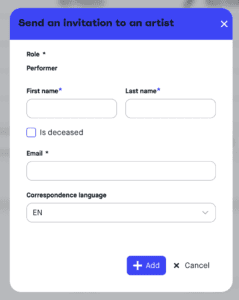
- During data entry, click “Send an invitation“
- Add the collaborator’s details:
- Last name, first name for individuals, preferred name for companies
- Email address
- Language of communication (French or English)
If this concerns a company that has ceased operations or a collaborator who has sadly passed away and for whom there is no known contract, you can indicate this. A process for recovering data from estates will be offered later.
3 – If you are a publisher, producer, or manager, you can create accounts for the artists you manage.
This is a feature that is not automatically offered to everyone; you will see this at the top of the stakeholder management page.

However, once you hold the roles of publisher, producer, or manager and are responsible for multiple artists and contributors, you can request this additional privilege directly on your associated role page. For example, on a music publishing company profile:

MetaMusic will validate your request, allowing you to create accounts for your artists who will have administrative rights, thus giving them full control. However, you—or other company representatives—will be able to complete most sections yourself as the account manager.

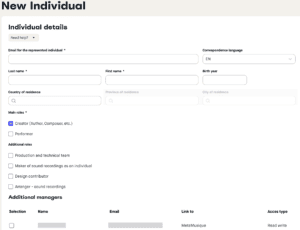
This technique is perfect if you only need to quickly create one to five artists or to supplement performers in a larger roster. If you need to add multiple performers at once, we’ve developed a batch creation module just for you. See below.
4 – Create bulk accounts for your artists, authors, directors, or an entire organization
This feature is a recent addition that was requested several times during testing. It allows for the creation of accounts in batches by importing them via an Excel document..
Originally designed to simplify the addition of ensembles such as symphony orchestras or choirs, it now allows us to meet the needs of many types of organizations. Whether it’s a record label, a management or publishing house, a studio with multiple directors and technicians, or any other type of organization, this method can be used to quickly create multiple contributors.
Click here to view the detailed procedure
If you have any questions on how to quickly implement MetaMusic in your organization, contact our team!
5 – Invite your colleagues after importing your SOCAN catalog
If you are a songwriter or publisher, you can import your SOCAN catalogue of works directly into MetaMusic. One benefit of this import is that it allows you to identify all the collaborators on your works who are not already present in MetaMusic.
And Now?
Now that you have gathered your basic information, you can go create an account on the MetaMusic portal. Once your account is created, you can gather your collaborators in several ways, which you can discover here.
If all your collaborators are already active or if you are working solo, you can already start documenting:
- the works already registered with SOCAN by importing your catalogue
- the sound recordings of which you are the producer
- the releases for which you are the maker or label
- the submissions to management companies and metadata exports
Don’t forget that MetaMusic invites you to sessions to help with metadata documentation. Come see us with your questions!