Nov. 4 2026
MetaMusic is a tool designed to simplify that part of the industry that’s hard to call exciting: metadata management. Yet, in the digital age, it’s the equivalent of album artwork. While it might not make you love it, MetaMusic’s mission is to make this tedious, mandatory task that comes with every release easier to digest. After getting to grips with the tool, you’ll see real time savings, both in retrieving information related to a release and in managing mandatory submissions and declarations, as well as your SEO. Our goal is to make what many find daunting simple and intuitive. MetaMusic exists precisely because you have to provide small pieces of information in multiple places, sometimes several times a year, with the same information. From now on, you can document your releases permanently once and then distribute them where necessary (and currently possible) in the correct format.
The challenge in developing a tool like MetaMusic is that the music industry, both locally and globally, doesn’t have a single way of handling marketing, declarations, or metadata management for an album. Therefore, it’s necessary to anticipate various scenarios and exceptions. This article will help you better understand who can do what within MetaMusic and will guide you to the appropriate resources.
Our success: the least amount of time spent per documented publication
Unlike most digital tools, success for MétaMusique won’t be measured by the time spent on the platform, but rather by the time you don’t spend there. We aim to minimize the time spent creating an account or documenting and submitting a release, and this will be one of our key indicators of success! MétaMusique will also evolve based on your feedback, regardless of your role. Whether it’s opportunities for improvement or bugs you encounter, you are more than welcome to let us know by writing to us directly!
What roles for which activities? Flexible, depending on your situation.
MetaMusic will not be used by everyone in the same way, nor will it require the same investment of time and effort.
If you don’t usually handle the management and administration of declarations or other rights-related matters, your contribution to MetaMusic is likely to be very simple, limited to creating an account and taking only a few minutes. This is the case for the majority of performers, producers, technicians, songwriters, and other contributors to album artwork/design, etc.
If you are a producer, artist-entrepreneur, manager of a music group that produces music, or if you handle declarations, legal deposits, or accounting reports for a label, maker, or publisher, MetaMusic will become an even more important tool. But you’ll also save time on copying and pasting the same information using your other usual reporting tools.
When creating your individual or business account, you must add the roles that directly concern you in order to have the corresponding rights and access.
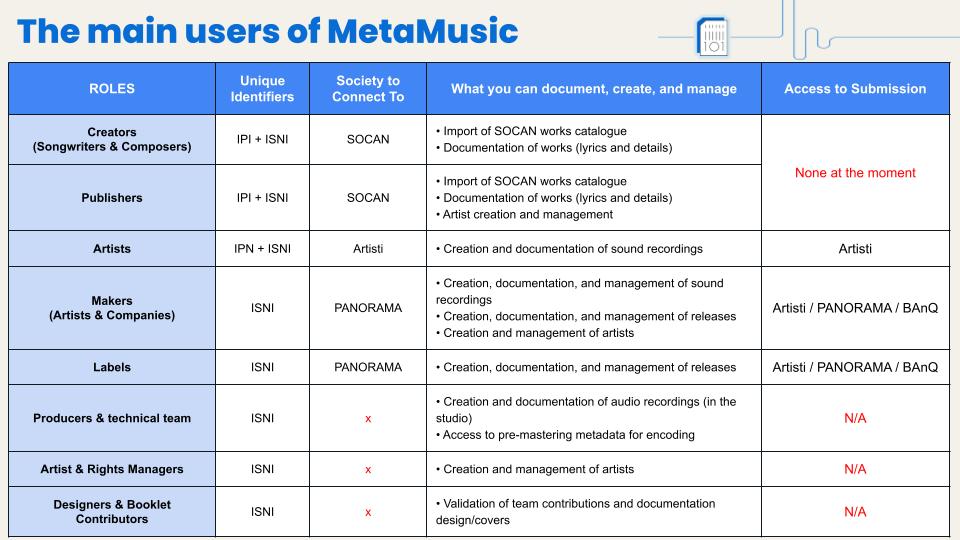
***The Artisti submission can be made if at least one member of the lineup has a validated Artisti connection via their performing artist role.
Click here to enlarge the image in another tab.
CREATION AND MANAGEMENT OF ACCOUNTS
The common starting point for everyone is to create an individual or business account, or even both.
Regardless of your role or type of contribution in the music industry, you can:
- Create your individual or business account, add roles, connect your management companies, and add unique identifiers.
- Delegate management to your team if you are an artist, and to your employees if you are a company, etc. It’s the same principle as a social media page. See our tutorial on the subject here.
For the Maker, Publisher, and Manager roles, you can:
- request the right to create new artists to create and manage individual accounts that remain under the control of the artists.
- Simply go to the page for one of the roles mentioned and submit your request. A tutorial will then guide you through the creation of artist profiles.
For all project leaders with more than 10 new contributors to MetaMusic, you can
- create bulk accounts for artists and contributors to a project or organization to save time and tracking effort. The Excel document and the procedure are available now!
For most industry participants, the main contribution to MetaMusic will be to create an account, keep their information up to date, and connect the management companies they belong to, and their work is done.
This is the case for many contributors.
- several accompanying performing artists who are not producers or solo artists
- design/cover contributors
- technical contributors (directors, mixers, sound engineers)
By making yourself available and completing your account, you simplify the process of identifying and declaring your contributions to your producers, labels, or publishers. Ultimately, this will streamline the processes for generating and receiving your royalty payments and ensure the recognition you are due wherever possible.
If you’re with a label, management company, or publishing house, you may have already received an invitation or your team may have created an account for you. Check your emails and follow the instructions. If you haven’t already, you can contact them.
TO SUPPORT YOU
MANAGEMENT OF WORKS
The management of works is done in two ways:
- by importing a SOCAN catalog
- by creating it manually if it is registered with another management company and has an ISWC. Currently, import is only possible for SOCAN members.
Works must still be registered directly with SOCAN before importing the catalogue into MetaMusic. Once processed by SOCAN, all your valid works will be added to MetaMusic within minutes, allowing for enhancements (lyrics, language, etc.) and the creation of a lasting association between works and sound recordings. When this is done, each work’s record will display the associated sound recordings.
For all roles and sub-roles of creators (authors, composers, translators, etc.) and editors, you can:
- Import a SOCAN catalogue that contains works with your IPI
- Create artworks manually if they cannot be added via SOCAN import:
- This applies if you are a foreign creator who is a member of another collective management organization and one or more of your works is performed or produced in Quebec.
- In this case, you must have all the credits and the ISWC for the work
- This applies if you are a foreign creator who is a member of another collective management organization and one or more of your works is performed or produced in Quebec.
Once the catalog is imported, your complete and valid works will be added and a diagnosis allows you to identify invalid works that may require your intervention.
You can then invite your colleagues:
- For creative roles (songwriter, composer, arranger, etc.): you can invite your creative and publishing collaborators by adding their email addresses.
- For editor roles: you can invite your collaborators and if you have account creation rights, you can create accounts for your creators.
Currently, the system does not allow for automatic catalog updates, but this is under discussion with SOCAN. Therefore, you must re-import your catalog if you have new titles registered with SOCAN.
TO SUPPORT YOU
SOUND RECORDING MANAGEMENT
The responsibility for documenting a sound recording generally falls to the producer, whether an individual producer or a company, regardless of its legal structure. This includes self-producers without a record label, as well as artist-producers licensed to a label. The good news is that, depending on your contractual situation or your record label’s practices, you can delegate this task by granting read-write access to your profile to your partners. This way, they can relieve you of this responsibility while still allowing you to maintain control of your account and the ability to approve the information.
For all producer roles (individual or company)
- You are responsible for documenting sound recordings in general, including in MetaMusic. Therefore, it is up to you to keep a record of who does what in the studio to facilitate the documentation process upon release.
- Similarly, make sure that the works you record are available in MetaMusic, especially if you are not the author. If you are recording a cover version or a work written by an unreachable author or otherwise, you can contact MétaMusique.
- In MetaMusic, you can create sound recordings and edit all their elements. This can be done directly in the studio to document collaborators live.
- The documentation (or finalization) task in MetaMusic can also be delegated to your management team or your record label.
- In any case, you will need to add them as managers of your account, see a quick tutorial.
For the roles of label/record company
- You cannot directly create a sound recording unless you also have the role of producer.
- If you create a sound recording where you are not the primary producer, you MUST add the actual primary producer and remove yourself from the section.
- Be aware, however, that by removing yourself from the section you will lose access to the recording. So make sure it is complete first.
- The best practice for a record label to manage and document sound recordings is to obtain Read/Write access for the relevant Producer so they can act on their behalf. See our tutorial for adding account managers or contact us if you need to regain access to one of your artists’ accounts.
For roles as artists, producers, or technicians
- You can create and edit sound recordings that you can document directly in the studio.
- But if you are not among the makers of the recording, you MUST add a maker in the First Maker section so that they can complete and declare it later.
- If you are unable to document contributions live, make sure to document contributions in the studio so as not to forget anything and provide this information to the production team or record company to ensure the accuracy of credits and metadata.
In MetaMusic, sound recordings must be documented individually in detail. However, if you record a 12-track release in the same studio, with the same performers, producers, or genres, you can duplicate a complete sound recording, then duplicate it again and adapt the differences, associating unique elements such as the title, associated work, ISRC, lyrics, etc. It is therefore crucial to carefully note what happens and to pass this information on to those who weren’t there!
GOOD TO KNOW: Incomplete audio recordings will prevent certain statements from being made. It is therefore important to complete as much of the required information as possible, based on the alerts provided  in different sections.
TO ACCOMPANY YOU
- Consult the procedure for the creation and documentation of a sound recording in MetaMusic
- Consult our detailed tutorials
- Participate in a documentation help session to guide you in creating your sound recordings.
RELEASE MANAGEMENT (Album, EP, Single)
The responsibility for documenting a release lies with the record label, in collaboration with the producer if the release is licensed. Indeed, a producer can create a release and add the record label later. Conversely, a record label can create a release and add the licensee to grant them access.
For the roles of label/record company
- You can create a publication and are responsible for its documentation.
- If you are operating under a license, you must add the producer who owns the license.
- If any sound recordings are incomplete, you must notify the producer or edit them if you have access to them.
For all producer roles (individual or company)
-
- You can create a post and
- add the record label to each of the relevant formats where applicable
- If you don’t have a record label, you are responsible for the documentation. Choose Independent in the format details section
- You are responsible for verifying that the sound recordings included in the release are complete to allow the release to be declared.
- The documentation (or finalization) task in MetaMusic can also be delegated to your management team.
- In all cases, you will need to add them as managers of your account. (see Procedure – Account Creation and Management)
- You can create a post and
For all other roles (performers, director, technician, designer or cover contributor)
- You cannot create publications, but they will be accessible and visible in your profile as soon as you are associated with them.
- If you are present in MetaMusic, make sure to specify this to the producer or record company so that they can add you there if necessary, especially for less visible roles such as technicians or designers.
TO ACCOMPANY YOU
- Consult the procedure for creating and documenting a publication in MetaMusic.
- Check out our detailed tutorials
- Participate in a documentation help session to guide you in creating your releases.
GESTION DES DÉPÔTS/DÉCLARATIONS ET EXPORTS
Avant de procéder à une déclaration, MétaMusique présente l’ensemble des crédits et métadonnées des enregistrements sonores dans la parution pour validation. Cette étape est cruciale pour assurer de la véracité et de la qualité des métadonnées qui serviront ensuite à référencer vos créations mais surtout à vous rémunérer. L’intérêt de MétaMusique consiste justement à rendre visibles les crédits et métadonnées à l’ensemble des contributeurs AVANT de tout envoyer pour permettre d’identifier les erreurs à cette étape. Aujourd’hui ces actions sont effectuées en plusieurs opérations sans toujours assurer un contrôle qui demande des efforts de correction supplémentaires par la suite.
La responsabilité de faire des déclarations peut être partagée par certains intervenants présents dans la parution. Par exemple, le producteur et la maison de disques peuvent toutes deux initier la déclaration SOPROQ et la terminer sur le portail Octave. Pour les déclarations Artisti, elles peuvent être faites par le producteur, un des artistes-interprètes de la parution et membre Artisti ou encore par la maison de disques dans un souci d’efficacité. Tous les contributeurs pourront voir si elle a en effet été déclarée, rendant impossible la double déclaration, et de télécharger les détails. Pour la future implantation du dépôt légal numérique de BAnQ, les producteurs/labels assujettis pourront le compléter lorsque celui-ci sera disponible.
Pour tous les rôles présents dans la parution
- Vous pouvez consulter et visualiser les détails des parutions sur lesquelles vous êtes présents, peu importe le rôle
- Vous pouvez signaler toute erreur ou omission au producteur/label le cas échéant
- Vous pouvez télécharger les détails de toute parution
Pour les rôles de label/maison de disques
- Vous pouvez faire la déclaration SOPROQ et la finaliser dans Octave
- Vous pouvez faire la déclaration Artisti si les line-ups sont complets
- Lorsque disponible, vous pourrez ajouter votre identifiant BAnQ et compléter le dépôt légal numérique
Pour tous les rôles de producteur (individuel ou entreprise)
- Vous êtes responsable de valider que les enregistrements sonores présents dans la parution sont complets pour permettre la déclaration de la parution
- Vous pouvez faire la déclaration SOPROQ et la finaliser dans Octave
- Vous pouvez faire la déclaration Artisti si les line-ups sont complets
- Lorsque disponible, vous pourrez ajouter votre identifiant BAnQ et compléter le dépôt légal numérique
- La tâche de déclaration dans MétaMusique peut aussi être déléguée à votre équipe de gestion
- Dans tous les cas, vous devrez les ajouter comme gestionnaire de votre compte. (voir la Marche à suivre – Création et gestion de compte)
Pour tous les rôles interprètes
- Vous pouvez faire la déclaration Artisti si les line-ups sont complets
POUR VOUS ACCOMPAGNER