Nov. 4 2026
Once your sound recordings and release are complete, you are ready to make your deposits and to export your metadata to use them in your marketing and distribution activities. Since August 2025, MetaMusic has allowed 2 types of exports and 3 essential connections for the local industry: Panorama, Artisti, and the BAnQ legal deposit. Over the coming months, MetaMusic will incorporate new opportunities to simplify your distribution work and maximize the impact of metadata on your discoverability.
Before submitting a declaration or exporting the data for distribution to the marketing team (radio tracking, press relations, digital marketing or SEO, etc.), be sure to validate your publication’s metadata to ensure it is complete and accurate!
What types of deposits and declarations are possible in MetaMusic?
Starting today, you can send declarations of your new releases to two collecting societies (Artists and Panorama), as well as complete your BAnQ legal deposit, directly from the MétaMusique platform. Other mandatory or standard declarations will be added over time based on industry demand. Don’t hesitate to let us know!
PANORAMA
- FOR WHO: Panorama member producers and record labels have access to submit new releases to Panorama. To do so, the company or artist must have logged into Panorama and the user must be one of the Panorama account administrators.
- WHERE CAN I FIND THE SUBMISSION: The declaration is located at the end of the publication’s record, in the section Submissions and Declarations.
- WHEN TO SUBMIT: You can submit the declaration as soon as it’s complete in MetaMusic and the Producer status is validated on all tracks. The declaration can be made before or after the release date.
- HOW DOES IT WORK: A declaration is initiated on Octave based on the information entered in MetaMusic. You are then prompted to validate this declaration on Octave to add the percentages and confirm. It will then be processed by Panorama and appear in your directory.

- FOR WHO: Any release featuring a performer approved by Artisti can be declared to Artisti. The declaration can be made by:
- Any of the performing artists connected to Artisti featured in the publication.
- The Maker
- The Record Label
- WHERE TO FIND IT: The submissions is found at the end of a release, in the section Registrations.
- WHEN TO DO IT: You can submit the declaration as soon as it is complete in MetaMusic, even if the release date has not yet passed.
- HOW IT WORKS: The declaration is made in just a few clicks, requiring no further action. The declaration will be processed by Artisti, and the artists will receive confirmation from Artisti. The person submitting the declaration will also receive an automatic email confirmation, which can be forwarded to the artists concerned if necessary!

- Since the 12th August 2025, you can complete the digital legal deposit for BAnQ directly on MetaMusic. You will also be able to generate the necessary document for the physical legal deposit in just a few clicks, which can be printed and added to your shipment or in-person drop-off.
- FOR WHO: All publications produced in Quebec must be subject to legal deposit, both in their physical and digital formats.
- All Quebec producers and labels that produce or exploit sound recordings, regardless of the artist’s origin.
- If you are the producer of an album or sound recordings exploited by a foreign record company, you must also make the legal deposit, whether digital or physical.
- The declaration can be made by:
- The Maker who has an 8-digit BAnQ customer number
- The Record Label has an 8-digit BAnQ customer number
- WHERE TO FIND IT: The declaration is located at the end of a release, in the Declarations section.
- WHEN TO SUBMIT IT: You can submit the declaration as soon as it is complete in MetaMusic, according to BAnQ’s requirements. See details on this announcement dedicated to the legal deposit of BAnQ.
- HOW IT WORKS: When the submission modal appears, add your cover art files (jpg, png, etc.) and the music files for each track (mp3, wav). MetaMusic sends these files weekly before deleting them from its system.
- You will receive an acknowledgement of receipt as soon as MetaMusic has received your full deposit.
Canadian legal deposit with Library and Archives Canada is also planned for a later phase.
How do I make a deposit in MetaMusic?
Once your publication details are validated and all statuses are green, you can now declare your publication!
-
- To do this, go to the page for the release in question and scroll down to the Registrations section.
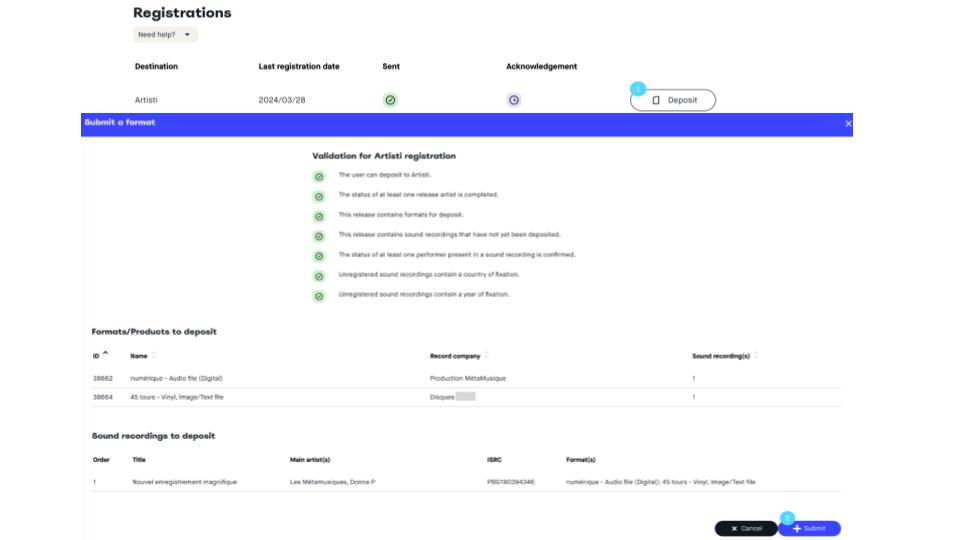
- Click on Deposit at the right side of the corresponding society you want to submit to (See #1 on the above image)
- In the modal that appears above the screen:
- Ensure the correct formats are there to submit
- Ensure it includes correct sound recordings you want to submit to
- Click on Submit to send your declaration (#2)
By following these steps, from validation to declarations, you ensure that your release is properly declared to the collecting societies and that all necessary information is correctly transmitted. If you have any questions, please don’t hesitate to contact our support team at support@metamusique.ca!
Reminder – Particularity of each deposit
Artistic Declaration:
- Once you have completed your declaration in MetaMusic, you don’t need to do anything else. Artisti will process your deposit and it will appear in your account as soon as it is validated.
- A processing time is to be expected before the declaration appears in your Artisti account..
Panorama Declaration:
- MetaMusic does not manage the information related to splits
- Once the declaration has been sent, you will need to log in to your Octave account to complete the information on the percentage rights and validate the declaration.
Confirmation of deposit and download
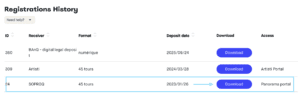
- Once your declaration has been sent, the submission details will appear in the section Registration History.
- You can download the summary of the statement in Excel format by clicking the button Download of the corresponding line.
What export options are available in MetaMusic?
From now on, you can perform several types of exports, both for each individual release and for your various catalogs of works, recordings, and releases. These exports will continue to evolve and be refined to better meet your needs and uses.
- Export of detailed metadata for a publication (.XLS format): Each publication can be exported in detail to an Excel document. This document can be used to reference a publication, individual online pieces, and to provide details to your promotion or radio tracking team. This first version is very detailed and will soon be available in lighter versions (without all identifiers or details) for the needs of marketing, media relations, and sales teams. This export is available to anyone who contributed to a publication.
- Detailed declarations (XLS): Once an Artisti or SOPROQ declaration has been completed, you will be able to download the details of it from the publication page.
- Export each of your catalogues (XLS format): Whether you have contributed to works, sound recordings or publications, it is possible to download a summary list of each of these catalogues in Excel format.
Export of detailed metadata for a release (.XLS format):
Each publication can be exported in detail to an Excel document. This document can be used to reference a publication, individual online pieces, and to provide details to your promotion or radio tracking team. This first version is very detailed and will soon be available in lighter versions (without all identifiers or details) for the needs of marketing, media relations, and sales teams. This export is available to anyone who contributed to a publication.
And Now?
Now that you have gathered your basic information, you can go create an account on the MetaMusic portal. Once your account is created, you can gather your collaborators in several ways, which you can discover here.
If all your collaborators are already active or if you are working solo, you can already start documenting:
- the works already registered with SOCAN by importing your catalogue
- the sound recordings of which you are the producer
- the releases for which you are the maker or label
- the submissions to management companies and metadata exports
Don’t forget that MetaMusic invites you to sessions to help with metadata documentation. Come see us with your questions!